


ABYDE FOR MOA MEMBERS

It's time for stress-free compliance.

  • EASIEST SOFTWARE YOU’LL EVER USE

    And if we’re being honest, easy is an understatement. All companies say it, but we are so confident in the simplicity of our software that we will prove it.

  • ‘HANDS OFF’ APPROACH

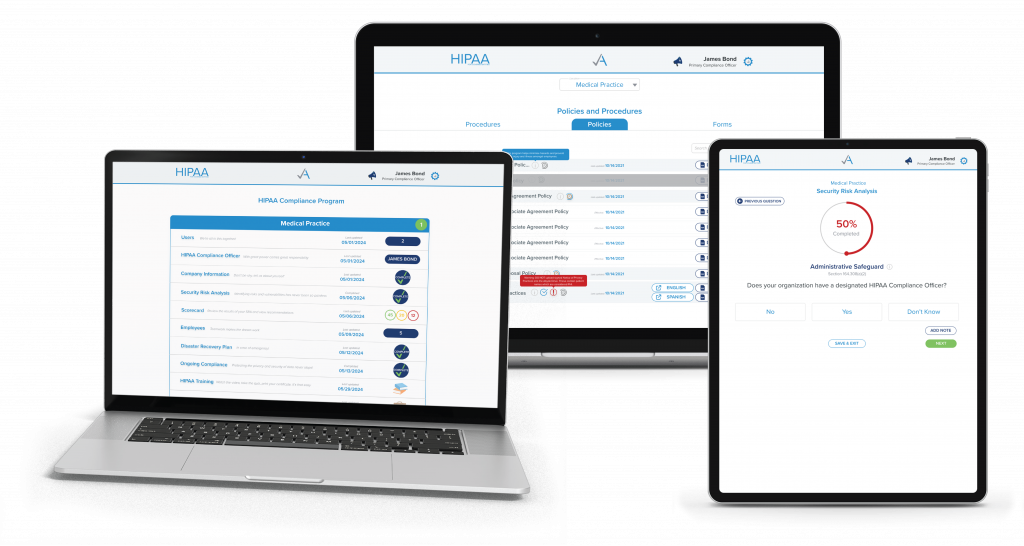
    We automate it all – from notifications about training to policy generation. Can you imagine not having to set your own reminders?! Go ahead, focus on your patients – we will ping you with the important stuff.

  • CUSTOMER SUCCESS TEAM LIKE NO OTHER

    We will meet you where you are – whether that’s by phone, chat, or email. It’s tough stuff in the tech space, but our customers love us as much as we love them.

  • STATE BY STATE, LAW BY LAW

    No matter what state your practice is in, our solution is for you — from sea to shining sea. We know our stuff and dedicate ourselves to staying on top of the latest state and federal changes so you don’t have to.

  • MORE THAN JUST SOFTWARE

    With us, you get more than policies and software. We offer Master Classes, newsletters, and more to keep you up to date. At the end of the day, we are proud to lead with education.

LATEST COMPLIANCE NEWS

Basic HIPAA Requirements

HIPAA Basics You Can’t Skip (Even If You’ve ‘Always Done It This Way’)

January 15, 2026 As your practice shakes off the post-holiday haze, it’s time to go back to basics. Before picking up the pace, it’s worth slowing down to look at the foundations. While your practice might have routine procedures, it’s time to double-check if they’re even compliant.   The Training Refresh Staff must complete HIPAA training when joining your practice, but that’s not all. HIPAA requires annual training and updates after policy changes or breaches, and whenever staff review is needed. Long story short, your practice needs a lot of training. When in doubt, provide staff training to ensure they are comfortable and confident in handling Protected Health Information (PHI).   Titles Matter Even in a small practice, it’s required to assign a HIPAA Compliance Officer (HCO). We know that ‘wearing many hats’ is the reality of a small team, but designating a clear leader for compliance provides a vital anchor. It ensures your staff knows exactly who to turn to for guidance. If the OCR ever comes knocking, they require a single point of contact to streamline the investigation. Social Media Savviness We hate to break it to you, but your Gen Z receptionist could make your practice viral for all the wrong reasons. Social media can be beneficial for sharing your practice to a larger audience, but your staff needs to handle it very carefully. While it might be fun to partake in the latest TikTok trend, make sure that any PHI cannot be seen in the clips, and do not include a patient in any content unless there is explicit consent to do so. Having a media consent form is key in these situations. Keep it General Alongside social media, Google reviews can be a great way to show you’re listening, but HIPAA changes what you can say. Even if the review is favorable, you cannot identify whether the patient has been in your practice or not. Even if the review details a specific experience at your practice, it’s their choice to disclose this information, and your job, under HIPAA, is not to confirm it. For instance, a good public review would be: Thanks for the kind words! If you have additional feedback, please call us at xxx-xxx-xxxx. If you get a negative review, keep your response brief and offline. First, check for spam or rule violations and report if necessary. Otherwise, don’t clarify details or if they’re a patient. A good response: Thank you for your feedback. We’d like to learn more. Please contact us at xxx-xxx-xxxx. Practices can, and have been, fined for improper Google review responses, so your team must remain calm and neutral online. Lock it Down While it might feel easier for your practice to use a single, shared email to log in and access everything, it’s much safer (and wiser) for every team member to have their own login with role-based permissions. Individual accounts create accountability, keep information organized, and enable the implementation of role-based access. Not everyone in your practice needs access to the same information, and they shouldn’t have it. For example, your receptionist likely doesn’t need access to X-rays or clinical notes, but they do need access to scheduling software. When permissions align with the job, you reduce the risk of accidental exposure and keep sensitive data limited to those who genuinely need it. Individual logins make off-boarding easy. When someone leaves, remove their access immediately without disrupting the team or requiring a shared password change. This small shift greatly boosts compliance and protects patient information. Change Habits Today It’s easy to let compliance fall to the bottom of the to-do list when you’ve “always done it this way”. Thankfully, intelligent software can streamline these requirements for you. With the right platform, you can ensure training is handled correctly, that dynamic policies and procedures are properly formatted for your team, and that you have access to a team of compliance experts when navigating difficult compliance questions. Take the next step: schedule a compliance consultation with our team. We’ll show you exactly how to meet HIPAA requirements, simplify your processes, and protect your practice with confidence. Contact us today to get started.

Read More »
End of Year HIPAA Checklist

End of Year HIPAA Checklist: 5 Things to Wrap Up Before 2026

December 30, 2025   You may be done wrapping gifts, but year-end is the perfect time to wrap up compliance loose ends and start the new year with everything tied up in a neat bow.  As your office returns to normal after a post-holiday haze, use the (hopefully) quiet time to get your compliance program in order. Here’s your practice’s end-of-year HIPAA checklist to help you confirm the essentials are handled and documented before 2026 begins.   Confirm HIPAA Training is Complete (and Documented) HIPAA training is required yearly and for all new staff members upon joining the team. As the year comes to a close, it’s strongly recommended to review all training documentation. This should include confirming that any new hires have received HIPAA onboarding training, verifying that all current staff completed training during the calendar year, and ensuring that your practice has the necessary documentation, such as training certificates, to prove it.  Maintaining records of your training is crucial. Not only does it keep your documentation organized, but the Office for Civil Rights (OCR) will require this proof if your practice is ever investigated.   Make sure your Right of Access Process is Crystal Clear to all Staff While patient record requests might seem simple, they’re one of the most common HIPAA violations. In fact, the latest HIPAA fine, exceeding $100,000, was issued due to one patient’s complaint after their records weren’t properly released.  Ensure your staff is aware of the process for releasing patient records and the strict timelines your practice must follow. On a federal level, records must be released within 30 days; however, depending on the state, they may be released even sooner.    Review your Business Associate Agreements (BAAs) This is one of the most common gaps across practices: vendors have access to PHI, but the paperwork isn’t complete or updated. The vendors, or Business Associates (BAs), with which your practice works must also follow HIPAA requirements. To protect your practice, ensure your practice has a Business Associate Agreement (BAA) in place with any vendors you work with. A BAA establishes legal liability if your BA experiences a breach. It also outlines the steps your vendor must take to maintain the security of Protected Health Information (PHI) and how to respond to a data breach.    Confirm your Security Risk Analysis (SRA) is Current The Security Risk Analysis (SRA) is at the foundation of a compliant practice. The SRA is a comprehensive review of all physical, technical, and administrative safeguards your practice has in place. For example, the SRA would review how your practice checks patients, as well as the operating system used on the computers in your practice.  Take this downtime to review your SRA. The OCR expects this to be an active, living document, not something that sits in a folder gathering dust. Ensure you have identified any new risks, such as new software implementations or changes in office layout, and have updated your SRA accordingly.    Update Your Policies and Procedures Operating on “outdated instructions” is a major liability. HIPAA requires that your written policies and procedures accurately reflect your practice’s current daily operations. If you’ve implemented new technology in your practice or changed any internal workflows, now is the time to ensure that the policies and procedures show that.  While policies and procedures might feel like just paperwork, alongside thorough training, they are the primary tools for ensuring your staff knows exactly how to handle and protect patient data.   Streamline Compliance in 2026 If this End of Year HIPAA checklist feels overwhelming to manage while running a busy practice, you’re not alone. The good news? You don’t have to do it manually. Smart compliance software is designed to eliminate the guesswork from the process. From dynamically generating your policies and procedures to automating employee training and guiding you through your SRA, turning hours of “paperwork” into a few simple clicks. Meet with a compliance expert today to see how you can streamline compliance in 2026.

Read More »

READY TO BE STRESS-FREE?